How to Use WhatsApp Fake Chats for Social Media Marketing
Social media marketing runs on content that feels like a conversation, not a broadcast. A WhatsApp chat screenshot borrows that feeling: readers already know how to read a thread, so the message lands before the selling starts. The format is the hook — the work is choosing one marketing job per post and building the exchange around it.
Step 1 — Pick one marketing job, and the format that fits it
One screenshot, one job. Pick from the menu below and build only that: build trust (answer a real question well), handle an objection (price, shipping, "does it work for me?"), show a product in use, turn a real testimonial into a visual, teach one tip, or show a behind-the-scenes moment. Then pick the format your audience will recognise — WhatsApp for everyday conversational posts, Telegram for announcement-style reveals, iMessage for short punchy exchanges. If you are unsure which format fits, the compare platforms page shows them side by side. Do not try to do all six jobs in one screenshot; a thread that sells, teaches and testifies at once does none of them.
Step 2 — Write the exchange before you open the generator
Write the dialogue as text first: a hook in the first bubble (the question or claim a scroller stops for), then 6 to 10 bubbles that earn the point, then a last line worth quoting. One idea per bubble; cut any bubble that does not advance the job you picked in Step 1. For an objection-handling post the shape is fixed: customer asks the hard question, the brand answers plainly in one bubble, the customer reacts, the brand adds one proof point — and the call to action lives in the caption, not in the chat.
Step 3 — Build it in the generator
Open the WhatsApp generator and type the exchange in: set the contact name and avatar, keep timestamps and read ticks consistent with the story, and keep the thread one-to-one. Check the look at phone-screen size before you export — if the hook is not readable without zooming, shorten the first bubble, not the font.
Step 4 — Export, then size it for the platform
Export the chat image, then place it on the platform's canvas in a design tool: square feed post, vertical story, or a slide. Keep the chat itself untouched — cropping the bubbles to fit a ratio breaks the format readers trust. Add the caption, hashtags and link outside the image, never inside the chat.
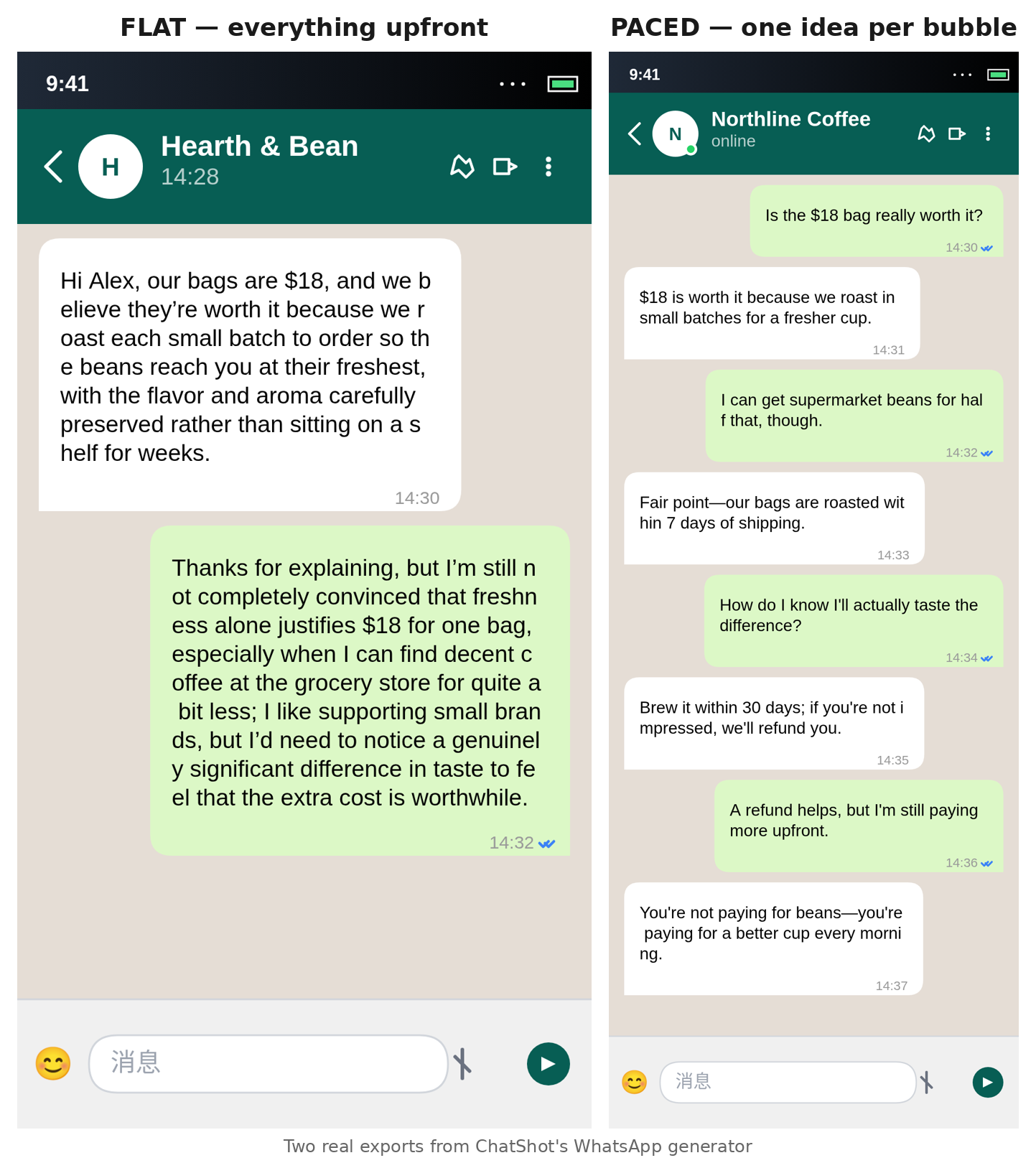
The pacing is the difference between a wall of text and a post people finish. One price objection, two shapings — the flat two-message version on the left, the paced 8-bubble version on the right. Both are real exports from the WhatsApp generator; the words differ, the job is the same.
Step 5 — Label it honestly
A mockup presented as a real customer conversation is a deception, not marketing. Label it where readers will see it — "illustrative mockup", "fictional chat for illustration" — in the caption, not buried. And the testimonial rule is absolute: only reformat words a real customer actually said, with their consent. A fabricated testimonial in chat form is still a fabricated testimonial.
Step 6 — Publish, measure, iterate on the hook
Track the numbers that tell you whether the format worked: saves and shares (did it travel?), comments (did it start a conversation?), click-through to the link in bio (did it convert?). If a post underperforms, change the hook — the first bubble — before you change anything else; the format is rarely the problem, the opening line usually is.
Worked example: handling the "is it worth the price?" objection
Job: handle the price objection. The exchange in the screenshot above, bubble by bubble:
- Hook, one bubble — the customer asks the price question plainly: "Is the $18 bag really worth it?"
- Answer, one bubble — the brand answers with one number and one reason: "$18 is worth it because we roast in small batches for a fresher cup."
- Reaction, two bubbles — the customer pushes back once ("I can get supermarket beans for half that, though."), the brand adds one proof point ("Fair point—our bags are roasted within 7 days of shipping.")
- Proof, two bubbles — the customer tests the claim ("How do I know I'll actually taste the difference?"), the brand answers with a guarantee ("Brew it within 30 days; if you're not impressed, we'll refund you.")
- Payoff, two bubbles — the customer raises the last objection ("A refund helps, but I'm still paying more upfront."), and the brand lands the quotable last line: "You're not paying for beans—you're paying for a better cup every morning."
Eight bubbles; the point is the shape, not the pitch. The caption carries the link and the "illustrative mockup" label.
Conclusion
WhatsApp fake chats turn marketing from broadcasting into conversing — but only when each post does one job, the exchange is written before it is built, and the mockup is labelled as a mockup. Pick the job, write the thread, check it at real size, label it honestly, and let the numbers decide the next hook.