How to Tell a Story with WhatsApp Chat Screenshots: A Step-by-Step Guide for Storytellers
Chat screenshots work as stories because readers already know how to read them: the eye lands on the first bubble, then follows the back-and-forth like eavesdropping on a private conversation. That intimacy is the whole advantage — and the whole risk. Build the story in that order: premise first, arc second, polish last.
Step 1 — Pick the format your readers will recognise
WhatsApp, Telegram and iMessage do not read the same: WhatsApp's green bubbles suit everyday, confessional stories; Telegram's cleaner thread suits announcement-style reveals; iMessage suits short, punchy exchanges. Open the generator for the format your audience will recognise instantly — WhatsApp, Telegram or iMessage — and check the look before you write a word. A format mismatch breaks the illusion before the first bubble lands.
Step 2 — Write the premise in one sentence
A story that fits in a chat thread needs one sentence you can say out loud: "a sister finds out her brother has been texting her ex", "a time traveller warns his past self about one meeting". If the premise needs a paragraph to explain, it will not survive as a screenshot. Write the premise first; every bubble after it must prove or complicate it.
Step 3 — Build a four-beat arc, not a list of messages
A chat story has four beats: hook (the first bubble makes a promise), setup (who is talking, what is at stake), turn (the misunderstanding, the reveal, the plot twist), and payoff (the quotable last line). Keep it short — 8 to 12 bubbles is usually enough. Every bubble should either advance the story or earn its place; cut any bubble that does neither. For longer stories, run the same characters across a series rather than stuffing one screenshot.
Step 4 — Give each voice a fingerprint
Distinct voices are what make readers believe two people are talking. Give each character a rhythm — one short and reactive, one longer and explanatory — and keep it consistent: different speech patterns, different emoji habits, different quirks. Use typing pauses and message timing the way a prose writer uses paragraph breaks: a pause between messages reads as real time passing. Avoid perfect grammar everywhere; one typo-free wall of text feels written, not chatted.
Step 5 — Run the pre-export readability check
Before exporting, check five things at the size your audience will actually see it (phone screen, feed card, slide): (1) the hook is readable without zooming; (2) timestamps and read ticks are consistent with the story; (3) names and avatars do not belong to real people; (4) nothing in the frame contradicts the caption it will sit under; (5) the last bubble is the line worth quoting. Fix, re-check, then export the image.
The same story, told two ways — flat on the left, paced on the right. Both are real exports from ChatShot's WhatsApp generator, built from the same premise: a sister finds out her brother has been texting her ex.
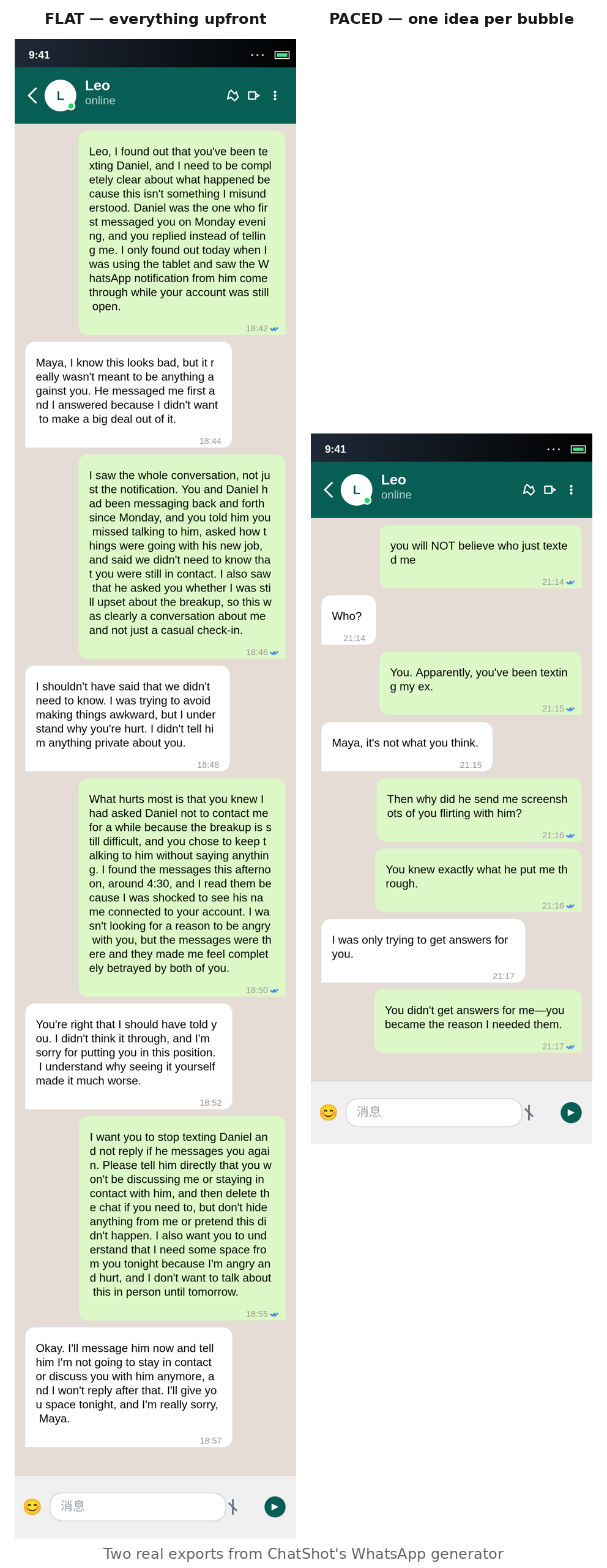
The flat version gives everything away in the first bubble — about 70 words before her brother gets a word in. The paced version spreads the same story across 8 short bubbles: a hook that makes a promise, then the reveal, then the turn, then a last line worth quoting.
Step 6 — Publish with an honest label
A mockup presented as a real conversation is a deception, not a story. Label it where readers will see it — "illustrative mockup", "fictional chat for illustration" — in the caption, not buried. The label costs nothing and protects everything the post earns: shares, saves and trust.
Worked example: the same story, paced
Premise: a sister finds out her brother has been texting her ex. Here is the paced version, exactly as ChatShot generated it — 8 bubbles, Maya on the right, her brother Leo on the left:
> "you will NOT believe who just texted me"
> "Who?"
> "You. Apparently, you've been texting my ex."
> "Maya, it's not what you think."
> "Then why did he send me screenshots of you flirting with him?"
> "You knew exactly what he put me through."
> "I was only trying to get answers for you."
> "You didn't get answers for me—you became the reason I needed them."
Hook, setup, turn, payoff — in that order. The flat version of the same premise opens like this, and it is all downhill from the first bubble:
> "Leo, I found out that you've been texting Daniel, and I need to be completely clear about what happened because this isn't something I misunderstood. Daniel was the one who first messaged you on Monday evening, and you replied instead of telling me. I only found out today when I was using the tablet and saw the WhatsApp notification from him come through while your account was still open."
Conclusion
WhatsApp chat format opens new possibilities for storytellers because it borrows the intimacy readers already bring to their own chats. Pick the format that fits the story, write the premise in one sentence, build the four-beat arc before you polish the wording, and check readability at real size before you export.