20 Most Popular WhatsApp Fake Chat Scenarios (With Creation Guide)
A fake WhatsApp chat is a staged screenshot, not a real conversation — and
that is the point. You control every line, every pause, every reaction, so
the screenshot says exactly what you need it to say. Below are 20 scenarios
that actually get reused, grouped by job. Every one uses the same setup in
ChatShot's free WhatsApp chat generator: type the dialogue
yourself one message at a time, check the contact name and status the
generator assigns, check the preview, and export the image.
> Different look needed? The same scenarios transfer to the
> Telegram chat generator for channel-style threads and the
> iMessage generator for iPhone-style threads.
1. Jokes, memes and pranks (scenarios 1–5)
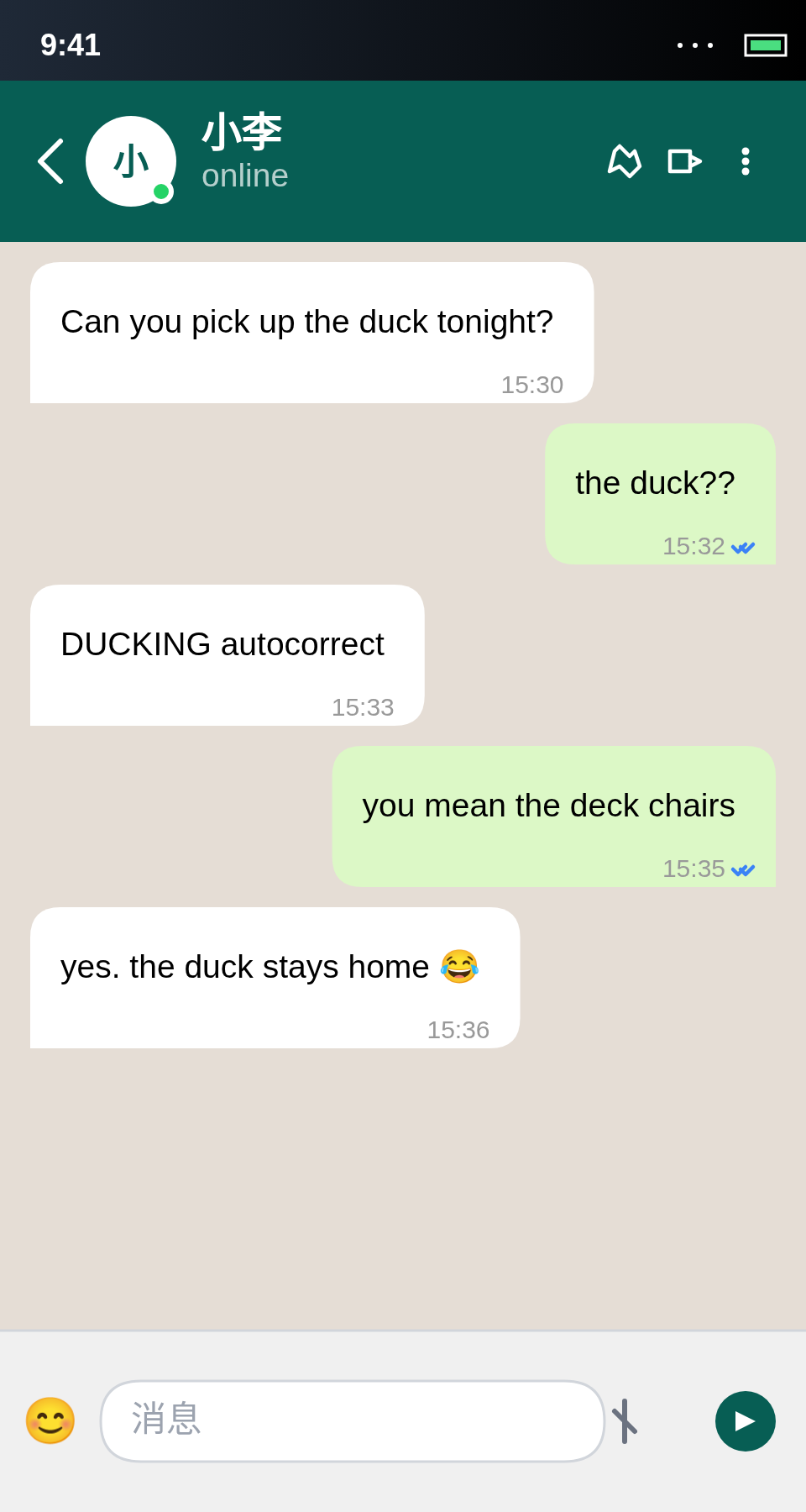
1. The autocorrect disaster. One message goes wrong, the next two try to
fix it, and the fix is worse. Keep it to 4–6 messages; the punchline is the
last bubble.
2. The misunderstood emoji. Someone reads a thumbs-up as sarcasm and the
thread spirals. Two senders, short bursts, one long defensive paragraph at
the end.
3. The exaggerated excuse. "My dog ate my homework" escalates into an
elaborate alibi, with the cover-up unfolding over several short bursts so
it reads like a real-time exchange.
4. The wrong-chat apology. A message meant for one person lands in the
wrong chat, and the next three messages are damage control. One contact,
one mistake — the comedy is in the backtracking.
5. The birthday ambush. A friend "accidentally" lets slip the surprise
party to the guest of honour in a one-to-one chat. Stage it, show the
friend, and keep it private rather than posting it as real.
2. Marketing, demos and presentations (scenarios 6–9)
6. The customer question, answered. Stage the exact support exchange a
visitor asks about — question, clarification, answer — and use the image on
a help page or in a deck instead of a wall of bullets.
7. The product announcement. A contact hears about a feature from a
friend, asks two questions, and gets a link. Reads instantly in a feed,
which is why it works as a social creative.
8. The before-and-after testimonial. Two short chats side by side: the
frustration before, the relief after. Use fictional names only, and never
present a staged testimonial as a real customer's words.
9. The pitch-deck scenario. One slide, one conversation: the objection,
the answer, the decision. A chat image carries a scenario faster than a
paragraph of positioning copy.
How to make any of these: keep the contact believable for the fictional
persona, keep one idea per bubble, and write pauses into the dialogue
instead of relying on the clock — a line like "sorry, was in a meeting"
does the work of a gap.
3. Education and training (scenarios 10–13)
10. The spot-the-fake lesson. Show students a staged chat, then ask them
to find the tells — identical timestamps, ten messages in one minute, a
contact name that never appears in the thread. Making one is the lesson.
11. The difficult customer role-play. Stage an angry first message, a
calm reply, and a resolution, then discuss what the reply did right. The
chat format keeps trainees focused on wording, not theatre.
12. The language-practice dialogue. Learners write a realistic exchange
in a second language inside a familiar format — ordering food, asking
directions, apologising for being late.
13. The history or literature scene. Two historical figures, or two
characters from a novel, "texting" about the event being studied. It forces
the writer to put the argument in spoken language.
4. Stories, fiction and creative work (scenarios 14–20)
14. The confession. One long message, a three-minute pause, then a
one-word reply. The gap between the bubbles does the dramatic work.
15. The plot twist. A friendly thread turns on a single message in the
middle — re-read from the top, every earlier line means something else.
16. The secret identity. Two people texting as strangers who clearly
know each other. The reader knows; the characters do not.
17. The time-traveller's warning. Messages arrive out of order in the
story's logic — the timestamps are the clue. Check the timestamps the
generator assigns before exporting; if they contradict the story, cut the
message that breaks it.
18. The talking pet. The pet "texts" in short bursts with perfect comic
timing, the owner replies in full sentences. Short beats long, every time.
19. The missed connection. Two people keep almost meeting across a
thread of near-misses — wrong chat, wrong name, right person, one message
too late.
20. The serial story. Publish one fictional exchange per post, with a
clear fiction label on the series. Each instalment ends on one unresolved
message, which is what brings readers back.
What not to do
- Never present a mockup as a real conversation, evidence, or a real
person's words.
- Never use a real person's name, photo, or number without their consent.
- Never use a staged chat to deceive, defame, or harass.
Try it yourself
Pick one scenario above, open the free WhatsApp chat generator,
and stage it in about five minutes. If the story needs a different look, the
Telegram and iMessage generators work the
same way.