How to Make WhatsApp Fake Chat Look 100% Real: 10 Professional Tips
Introduction
Creating realistic fake chat screenshots is an art that combines technical precision with human psychology. In this comprehensive guide, we'll reveal the 10 professional techniques that separate amateur attempts from truly convincing results.
Realism is not one trick. It is a dozen small consistencies, and the eye
catches the one you missed. These 10 tips are the checks professionals run
before exporting a WhatsApp mockup from ChatShot's
free WhatsApp chat generator. Every step is manual: you
write the dialogue, check the details the generator assigns, and check the
preview yourself.
1. Start with a plausible contact
Check the contact the generator assigns: a believable name, a status line
that fits the scene, and an avatar that matches. "John Smith, online, last
seen today" is forgettable, which is exactly right — a contact that draws
attention to itself looks staged. The contact is assigned by the generator,
not typed in, so if it doesn't fit the scene, change the scene's framing
until it does.
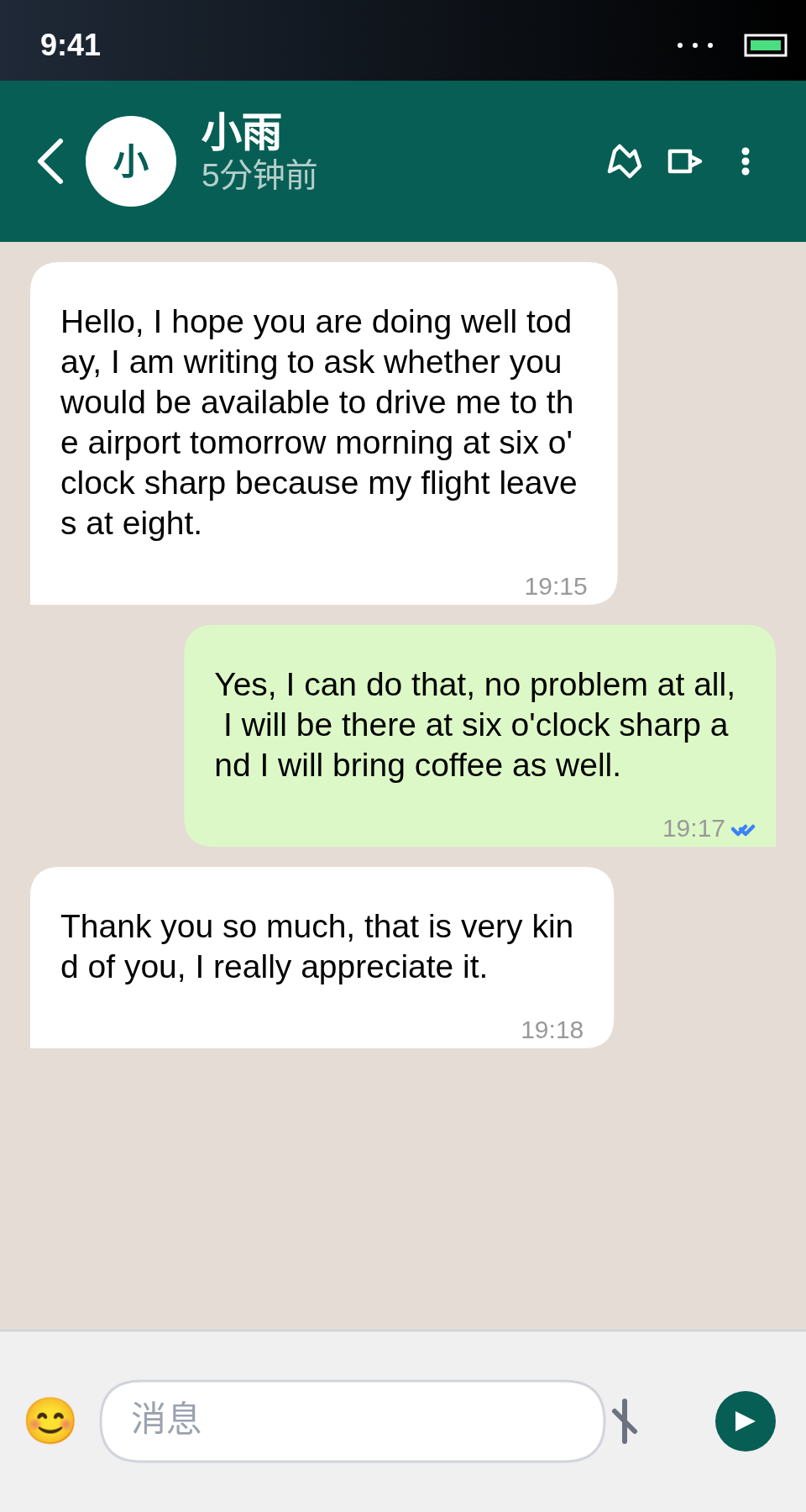
2. Vary message lengths
Real people do not write ten equal paragraphs. Mix one-word replies ("ok",
"lol", "wait what") with one longer message, and put the long message where
someone would actually stop to explain something.
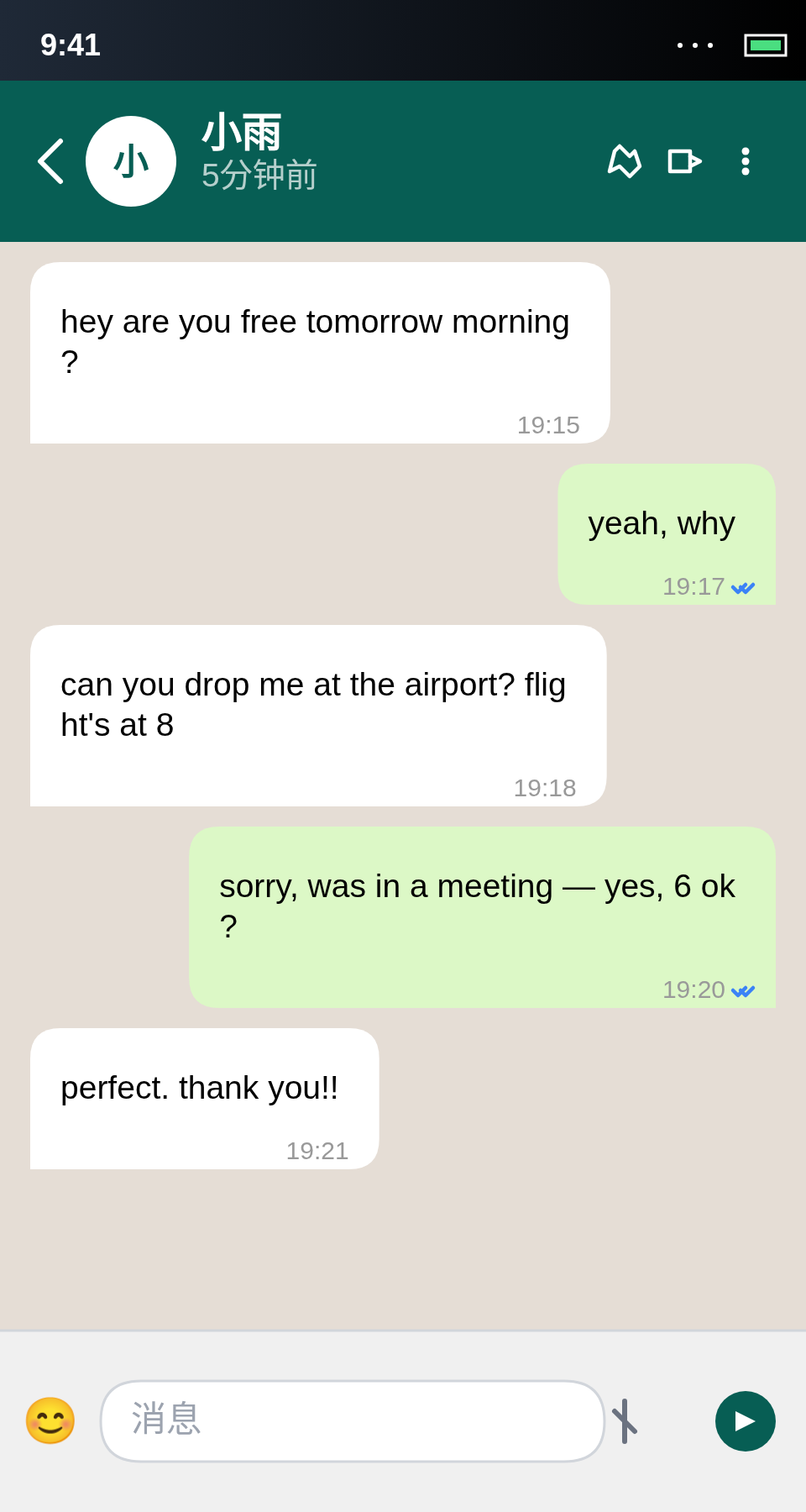
3. Write bursts like real time
A burst of messages shares a minute; a reply after a thought takes several.
Write that rhythm into the dialogue — short bursts, then a pause explained
in a line ("sorry, was in a meeting") — instead of stamping ten messages in
one minute. Before exporting, check the timestamps the generator assigns:
ten messages sharing one minute is the single most common tell, and the fix
is to trim the thread, not to re-stamp it.
4. Read the ticks as a timeline check
Ticks should tell one story: read, unread, or delivered, in the order the
conversation implies. Check the ticks in the preview — a message shown as
read before the reply it answers breaks the timeline a careful reader will
notice. If the ticks contradict the order, edit the wording so the order
reads naturally, or generate a fresh thread.
5. Let the language be imperfect
Real chats have typos, abbreviations, a message sent twice, a correction
starred a minute later. One small imperfection per thread is enough; a
perfectly punctuated essay in a chat bubble reads as written, not typed.
6. One idea per bubble
People send a thought, then the next thought, as separate messages. Split
a long explanation into two or three short bubbles and the thread instantly
looks like a phone, not a document.
7. Keep it one-to-one
The generator stages two-person chats. A scene that needs eight participants
is a tell — if the scene needs more voices, stage it as separate one-to-one
chats instead of forcing a crowd into one thread.
8. Match the status to the scene
Check the status line the generator assigns against the timestamps before
exporting. An "online" contact who takes forty minutes to reply, or a "last
seen" time that falls after the messages it supposedly precedes, contradicts
itself.
9. Preview at full size before exporting
Open the preview, read it as a stranger would, and look for the details
that only show up at full size: a clipped bubble, a name spelled two ways,
a status line that repeats the contact name. Fix it in the editor, not
after export.
Before: the same airport-lift request written as long, evenly punctuated paragraphs.
After: the same request rewritten with short messages and a pause line doing the time-gap work.
10. Label fiction as fiction
The most professional habit is also the simplest: if the conversation never
happened, say so where it is published. A mockup labelled as a mockup keeps
its credibility; one presented as real loses it the moment anyone checks.
Checklist before you export
Contact and status plausible; message lengths varied; timestamps checked
against the story; ticks consistent; one imperfection, not ten; one idea per
bubble; cast sized to the scene; status matched to timestamps; full-size
preview read once; fiction labelled. Run it in the
WhatsApp generator — the Telegram and
iMessage generators reward the same checks.
Conclusion
Mastering these 10 professional tips will elevate your fake chat creations from amateur to expert level. Remember, authenticity comes from attention to detail and understanding human communication patterns. Run through the checks in the WhatsApp generator before exporting.