How to Use Fake Chat Screenshots in Teaching: A Step-by-Step Guide for Educators
A staged chat screenshot is a conversation that never happened — and that is exactly what makes it useful in a classroom. You control every line, so the example says precisely what the lesson needs it to say, with no real student's messages, no real phone numbers, and no privacy problem. This guide shows how to build teaching material from fake chat screenshots, step by step, in ChatShot's free generators. No install, no signup.
Before you start: the 3-minute setup
Every example below uses the same setup:
> Different look needed? The Telegram chat generator gives the same steps in Telegram's look; the iMessage generator suits iPhone-style text threads. The steps below transfer directly.
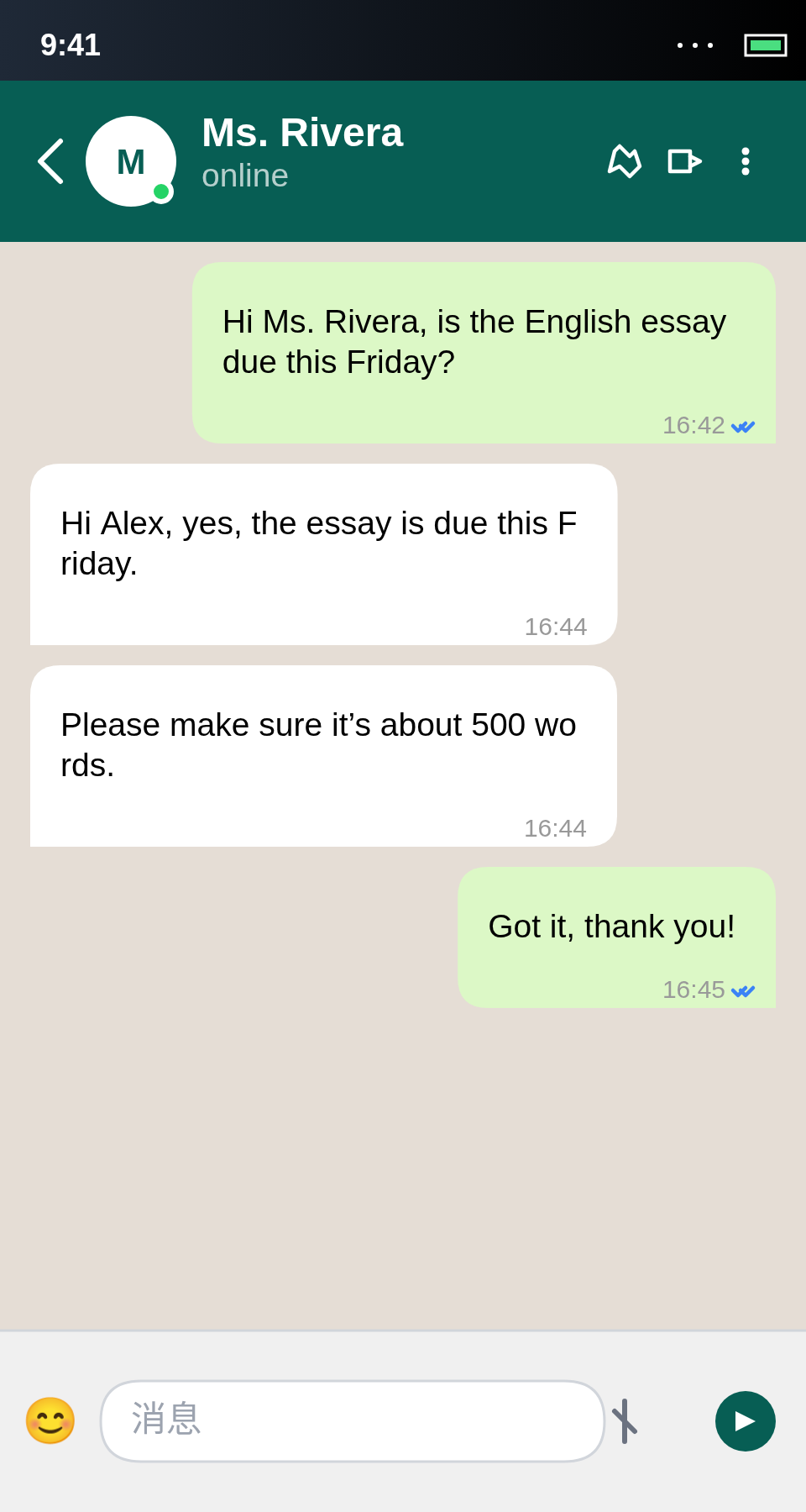
1. Language learning: write the dialogue, don't just read it
The lesson. Learners write a realistic exchange in the target language inside a format they already use every day — ordering food, asking directions, apologising for being late. Writing dialogue forces word choice and register in a way a gap-fill exercise does not.
How to make it. Describe a fictional shopkeeper or classmate in the scenario, check the contact name the generator assigned, then rewrite the generated exchange in the target language, keeping each message to one idea. Deliberately include one common learner mistake in the first version, then show the corrected version as a second screenshot — the before/after pair is the teaching point.
Classroom move. Hand out the screenshot with one message blanked and ask learners to fill it in, then compare with the original.
2. Business and workplace training: role-play without the role-play
The lesson. Stage the difficult conversation — an unhappy customer, a confused user, a missed deadline — as a chat, then discuss what the reply did right. The chat format keeps trainees focused on wording, not performance.
How to make it. Give the two sides fictional roles ("Customer", "Support"), not real people — describe them in the scenario and check the names the generator assigned. Keep the opening message short and emotional, the reply calm and specific, and the resolution in one closing message. Three to five messages is enough; a wall of text reads like a memo, not a chat.
Classroom move. Show only the first two messages, ask trainees to write the reply, then reveal the staged answer and compare approaches.
3. Healthcare education: simulate the consultation
The lesson. Simulate a patient interaction — booking an appointment, describing symptoms, receiving follow-up instructions — so trainees can practise professional tone and clarity before they meet real patients.
How to make it. Use clearly fictional names and invented symptoms, and label the material as a simulation wherever it is shown. Keep the language plain and the exchange short: request, clarification, instruction, confirmation. If the scenario involves sensitive health information, keep it entirely invented — never base it on a real case.
Classroom move. Ask trainees to spot the tone problem in a deliberately blunt version, then rewrite it as a second screenshot.
4. Social-skills training: show, don't lecture
The lesson. Demonstrate appropriate communication — apologising, declining politely, asking for help — in concrete examples instead of abstract rules. Learners can see the difference between a blunt message and a considerate one, side by side.
How to make it. Build the same situation twice: once with a blunt exchange, once with a considerate one. Change only the wording, not the situation, so the contrast teaches the point. Check the timestamps the generator assigned — a burst of messages shares a minute; a considered reply takes several. If the timing contradicts the story, adjust the scenario and generate again.
Classroom move. Ask learners which version they would rather receive, and why — the discussion is the lesson.
Best practices for classroom mockups
- Keep scenarios realistic. One plausible situation, fictional names, believable timing. Ten participants in a casual chat is an instant tell.
- Match the language level. A beginner class needs short, simple messages; an advanced class can handle idiom, hesitation, and a correction mid-thread.
- Include one mistake, not ten. A single typo or correction makes a thread feel real; a thread full of errors just looks careless.
- Label fiction as fiction. If the conversation never happened, say so on the slide or worksheet. A mockup labelled as a mockup keeps its credibility; one presented as real loses it the moment anyone checks.
- Check before you export. Preview at full size and read it as a stranger would: a name spelled two ways, a status that contradicts the timestamps, a message marked read before the reply it answers — rewrite the wording in the editor, or adjust the scenario and generate again; don't leave it until after export.
What not to do
- Never present a mockup as a real conversation, evidence, or a real person's words.
- Never use a real person's name, photo, or number without their consent — in teaching material, fictional names are always the right choice.
- Never build teaching examples from real students' or patients' messages.
Try it yourself
Pick one lesson above, open the free WhatsApp chat generator, and stage it in about five minutes. If your material needs a different look, the Telegram and iMessage generators work the same way.